Docker-Compose with Laravel Application server, Nginx, MySQL server, Python Django, Golang Gin API
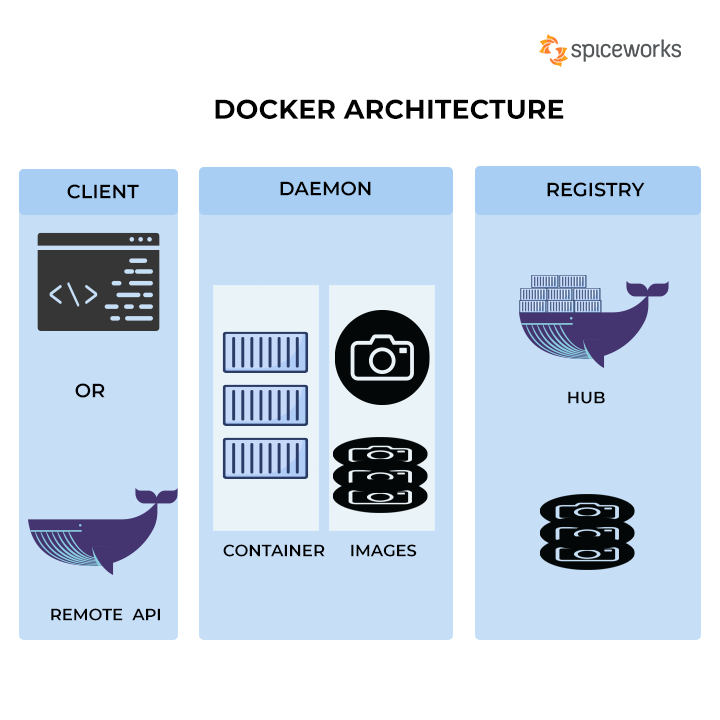
Docker-Compose is a powerful tool that enables developers to define and manage multi-container Docker applications. In this guide, we’ll explore how to use Docker-Compose to orchestrate a diverse set of services for a full-stack application. Our example application will include Laravel as the application server, Nginx as the web server, MySQL for database storage, Python with Django for the backend, and Golang with Gin for the API.
Setting Up the Project Structure
Start by creating a project directory and organizing it into subdirectories for each service:
mkdir multi-service-app
cd multi-service-app
Inside the project directory, create the following structure:
multi-service-app/
|-- app/
|   |-- (Django and Python files)
|-- laravel/
|   |-- (Laravel files)
|-- nginx/
|   |-- (Nginx configuration)
|-- go/
|   |-- (Gin and Golang files)
|-- docker-compose.yml
Docker-Compose Configuration
Create a docker-compose.yml file in the project root to define the services, networks, and volumes:
version: '3'
services:
  laravel:
    build:
      context: ./laravel
    volumes:
      - ./laravel:/var/www/html
    ports:
      - "8000:8000"

  nginx:
    build:
      context: ./nginx
    ports:
      - "80:80"
    depends_on:
      - laravel

  mysql:
    image: mysql:latest
    environment:
      MYSQL_ROOT_PASSWORD: rootpass
      MYSQL_DATABASE: laravel_db
      MYSQL_USER: laravel_user
      MYSQL_PASSWORD: laravel_pass

  django:
    build:
      context: ./app
    volumes:
      - ./app:/app
    ports:
      - "8001:8001"

  golang:
    build:
      context: ./go
    ports:
      - "8080:8080"
This docker-compose.yml file specifies services for Laravel, Nginx, MySQL, Django, and Golang. It also defines the necessary configurations and dependencies between services.
Dockerfile for Laravel
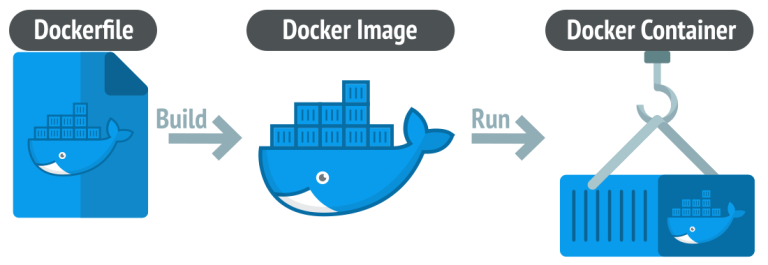
Create a Dockerfile inside the laravel directory:
FROM php:7.4-fpm

WORKDIR /var/www/html

RUN apt-get update && apt-get install -y \
    git \
    unzip \
    libzip-dev \
    && docker-php-ext-install pdo_mysql zip

RUN curl -sS https://getcomposer.org/installer | php -- --install-dir=/usr/local/bin --filename=composer

COPY . .

RUN composer install
This Dockerfile sets up a PHP environment, installs necessary dependencies, and copies the Laravel application files.
Dockerfile for Nginx
Create a Dockerfile inside the nginx directory:
FROM nginx:latest

COPY ./nginx.conf /etc/nginx/nginx.conf
COPY ./laravel/public /var/www/html

EXPOSE 80
This Dockerfile configures Nginx by replacing its default configuration with a custom nginx.conf file and copying the Laravel application files to the appropriate directory.
Dockerfile for Django (app directory)
Create a Dockerfile inside the app directory:
FROM python:3.8

WORKDIR /app

COPY . .

RUN pip install -r requirements.txt

CMD ["python", "manage.py", "runserver", "0.0.0.0:8001"]
This Dockerfile sets up a Python environment, installs dependencies, and runs the Django development server.
Dockerfile for Golang
Create a Dockerfile inside the go directory:
FROM golang:latest

WORKDIR /app

COPY . .

RUN go build -o main .

CMD ["./main"]
This Dockerfile sets up a Golang environment, copies the Golang application files, and builds the executable.
Nginx Configuration (nginx directory)
Create an nginx.conf file inside the nginx directory:
server {
    listen 80;
    server_name localhost;

    location / {
        try_files $uri $uri/ /index.php?$query_string;
    }

    location ~ \.php$ {
        include snippets/fastcgi-php.conf;
        fastcgi_pass laravel:9000;
        fastcgi_param SCRIPT_FILENAME $document_root$fastcgi_script_name;
        include fastcgi_params;
    }

    error_log  /var/log/nginx/error.log;
    access_log /var/log/nginx/access.log;
}
This configuration file defines how Nginx should handle requests and proxy them to the Laravel PHP-FPM container.
Running the Application
Navigate to the project root directory and execute the following command:
docker-compose up --build
This command will build the necessary Docker images and start the containers for Laravel, Nginx, MySQL, Django, and Golang.
Access the Laravel application at http://localhost:8000, the Django application at http://localhost:8001, and the Golang API at http://localhost:8080.
Conclusion
Docker-Compose is a powerful tool for simplifying the deployment and orchestration of multi-container applications. In this guide, we’ve demonstrated how to use Docker-Compose to bring together a diverse set of services, including Laravel, Nginx, MySQL, Django, and Golang, into a cohesive and easily manageable development environment. This approach allows developers to work with multiple technologies seamlessly, fostering collaboration and efficient development workflows.