Angular, ReactJS, and Vue.js are three popular JavaScript frameworks/libraries used for building user interfaces (UIs) and single-page applications (SPAs) on the web.
- Angular: Developed and maintained by Google, Angular is a comprehensive framework for building large-scale and feature-rich applications. It follows the MVC (Model-View-Controller) architecture and provides features like two-way data binding, dependency injection, and modular development. Angular offers a full-fledged solution for building complex web applications with features such as routing, forms handling, HTTP client, and more.
- ReactJS: Developed and maintained by Facebook, ReactJS is a JavaScript library for building user interfaces, particularly for single-page applications. React follows a component-based architecture where UIs are composed of reusable components. It introduces a virtual DOM for efficient rendering and provides a declarative approach to building UIs, making it easier to manage and update UI components as the application state changes. React is highly flexible and can be integrated with other libraries and frameworks.
- Vue.js: Vue.js is a progressive JavaScript framework for building user interfaces. It is designed to be incrementally adoptable, meaning you can start using it for small parts of your application and gradually scale it up as needed. Vue.js provides features such as reactive data binding, component-based architecture, and a simple and intuitive API. It also offers directives for handling DOM manipulations and transitions. Vue.js has gained popularity due to its simplicity, ease of learning, and performance.
Each of these frameworks/libraries has its own strengths and weaknesses, and the choice between them often depends on factors such as project requirements, developer preferences, and the specific needs of the application being built.

What is different between Angular, ReactJS, VueJS? Side by Side Comparison
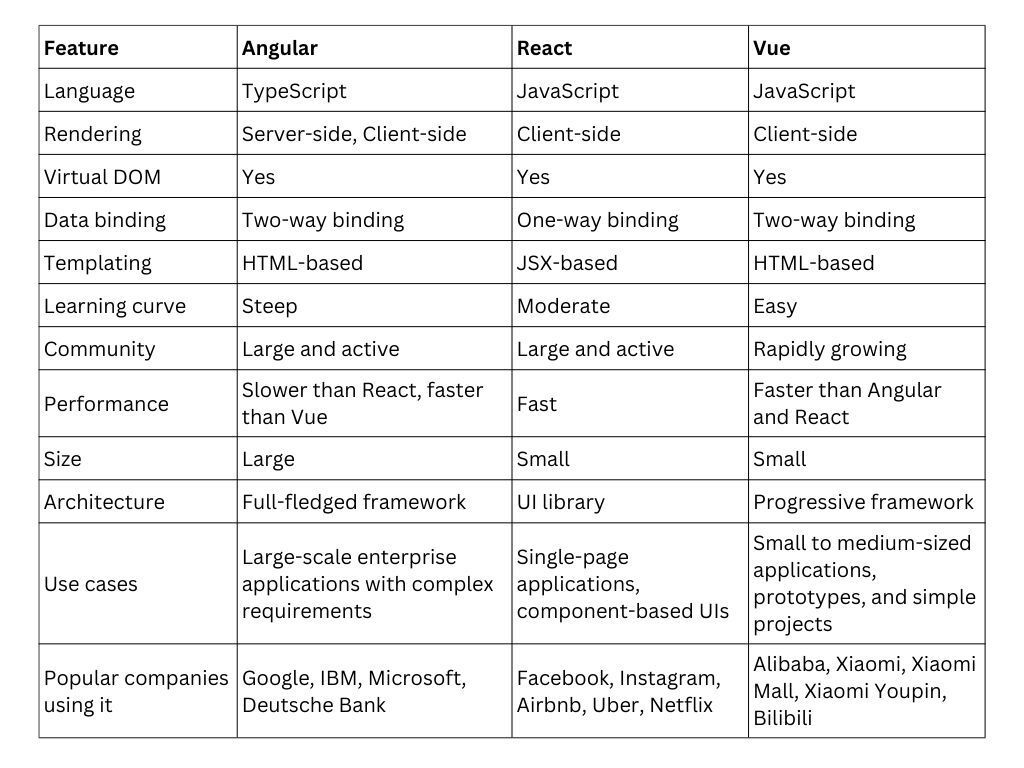
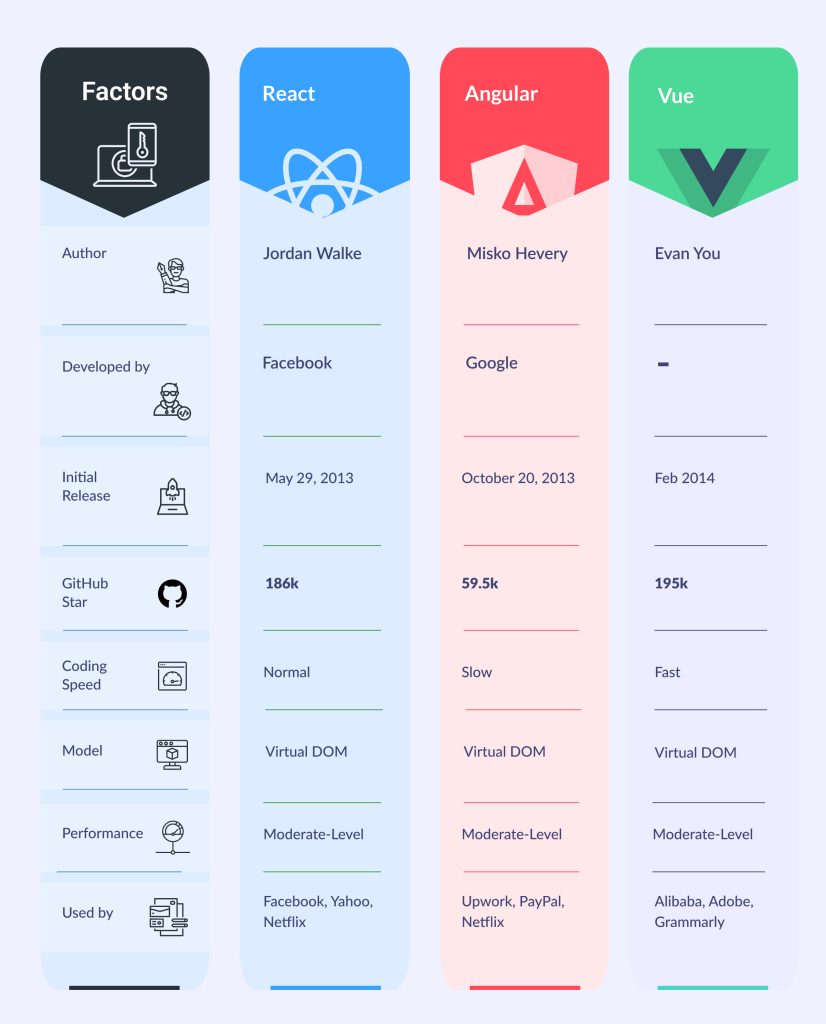
Comparison of Angular, ReactJS, and Vue.js across various aspects:
1- Popularity and Adoption:
- Angular: Widely adopted for enterprise-level applications, especially due to Google’s backing and support. It has a large community and ecosystem.
- ReactJS: Extremely popular, especially in the developer community, for its simplicity and flexibility. Widely used in both small and large-scale applications. Has a vast ecosystem of libraries and tools.
- Vue.js: Rapidly growing in popularity due to its simplicity and ease of learning. Often favored for smaller projects or by developers who prefer a more lightweight framework.
2- Learning Curve:
- Angular: Has a steeper learning curve compared to React and Vue.js due to its comprehensive nature and the use of TypeScript by default.
- ReactJS: Relatively easier to learn, especially for developers with a good understanding of JavaScript. The component-based architecture is intuitive, but understanding concepts like JSX and state management might require some initial effort.
- Vue.js: Known for its gentle learning curve, making it accessible to beginners. Its syntax and concepts are straightforward, resembling plain HTML, CSS, and JavaScript.
3- Architecture:
- Angular: Follows the MVC (Model-View-Controller) architecture out of the box. Offers a comprehensive solution with built-in features like two-way data binding, dependency injection, and a powerful CLI.
- ReactJS: Embraces a component-based architecture where UIs are composed of reusable components. It’s more of a library than a full-fledged framework, focusing solely on the view layer.
- Vue.js: Also follows a component-based architecture similar to React, but offers more flexibility in terms of integrating with existing projects or gradually adopting it in parts of an application.
4- Data Binding:
- Angular: Supports two-way data binding by default, meaning changes in the UI automatically update the underlying data model and vice versa.
- ReactJS: Utilizes one-way data flow, where data flows downward from parent to child components. It encourages a unidirectional data flow, making data flow more predictable.
- Vue.js: Supports both one-way and two-way data binding. It provides directives for handling reactive updates in the DOM, similar to Angular, but with a simpler syntax.
5- Performance:
- Angular: Offers good performance out of the box, especially for complex and large-scale applications. The performance can be further optimized using features like Ahead-of-Time (AOT) compilation.
- ReactJS: Known for its efficient rendering with the help of the virtual DOM, which minimizes actual DOM manipulation and enhances performance.
- Vue.js: Also known for its performance due to its virtual DOM implementation and optimized reactivity system. It’s lightweight, making it suitable for fast rendering and small bundle sizes.
6- Community and Ecosystem:
- Angular: Backed by Google and has a large community, extensive documentation, and a rich ecosystem of libraries, tools, and third-party integrations.
- ReactJS: Maintained by Facebook and has a massive community, with a plethora of libraries, tools (like Redux for state management), and extensive documentation available.
- Vue.js: Although smaller in comparison to Angular and React, Vue.js has a rapidly growing community and ecosystem, with a variety of plugins and tools available for different use cases.
Each of these frameworks/libraries has its own set of strengths and weaknesses, and the choice between them often depends on project requirements, team expertise, and personal preferences.
Here’s a simple create a basic “Hello World” component in Angular, ReactJS, and Vue.js:
Angular:
// app.component.ts
import { Component } from '@angular/core';

@Component({
  selector: 'app-root',
  template: '<h1>Hello Angular!</h1>',
})
export class AppComponent {}
ReactJS:
// App.js
import React from 'react';

function App() {
  return (
    <div>
      <h1>Hello ReactJS!</h1>
    </div>
  );
}

export default App;
Vue.js:
<!-- App.vue -->
<template>
  <div>
    <h1>Hello Vue.js!</h1>
  </div>
</template>

<script>
export default {
  name: 'App',
};
</script>
In each of these examples:
- Angular: We define a component using
@Componentdecorator with atemplatecontaining HTML markup. TheAppComponentclass represents the component logic. - ReactJS: We define a functional component
Appthat returns JSX markup. JSX is a syntax extension for JavaScript used with React, which allows writing HTML-like structures in JavaScript. - Vue.js: We define a Vue.js component using a
<template>tag containing HTML markup and a<script>tag containing the component’s logic. In this case, the component is represented by theAppobject.
These examples demonstrate the basic structure of components in each framework/library, each rendering a simple “Hello World” message.
Another examples of data binding in Angular, ReactJS, and Vue.js, How data can be bound between the Model (data) and the View (UI):
Angular:
// app.component.ts
import { Component } from '@angular/core';

@Component({
  selector: 'app-root',
  template: `
    <h2>{{ greeting }}</h2>
    <input type="text" [(ngModel)]="name" placeholder="Enter your name">
  `,
})
export class AppComponent {
  greeting: string = "Hello";
  name: string = "";

  constructor() {
    this.updateGreeting();
  }

  updateGreeting() {
    this.greeting = `Hello, ${this.name || 'World'}!`;
  }
}
ReactJS:
// App.js
import React, { useState } from 'react';

function App() {
  const [name, setName] = useState("");

  const updateGreeting = () => {
    return `Hello, ${name || 'World'}!`;
  };

  return (
    <div>
      <h2>{updateGreeting()}</h2>
      <input
        type="text"
        value={name}
        onChange={(e) => setName(e.target.value)}
        placeholder="Enter your name"
      />
    </div>
  );
}

export default App;
Vue.js:
<!-- App.vue -->
<template>
  <div>
    <h2>{{ updateGreeting() }}</h2>
    <input type="text" v-model="name" placeholder="Enter your name">
  </div>
</template>

<script>
export default {
  data() {
    return {
      name: "",
    };
  },
  methods: {
    updateGreeting() {
      return `Hello, ${this.name || 'World'}!`;
    },
  },
};
</script>
In these examples:
- Angular: We use
ngModelfor two-way data binding, binding the input field to thenameproperty in the component class. When the input changes, Angular automatically updates thenameproperty, and vice versa. We utilize interpolation ({{ }}) to display the dynamic greeting message. - ReactJS: We use the
useStatehook to create thenamestate variable, which represents the value of the input field. We use thevalueattribute to bind the input field to thenamestate variable, and theonChangeevent to update thenamevariable when the input changes. We then use a function to generate the greeting message dynamically. - Vue.js: We use
v-modelfor two-way data binding, binding the input field to thenamedata property. Similar to Angular, changes in the input field automatically update thenameproperty, and vice versa. We use a method to dynamically generate the greeting message based on the value ofname.
Another more complex example for each framework/library. We’ll build a simple counter application where users can increment, decrement, and reset the counter value.
Angular:
// counter.component.ts
import { Component } from '@angular/core';

@Component({
  selector: 'app-counter',
  template: `
    <h2>Counter: {{ counter }}</h2>
    <button (click)="increment()">Increment</button>
    <button (click)="decrement()">Decrement</button>
    <button (click)="reset()">Reset</button>
  `,
})
export class CounterComponent {
  counter: number = 0;

  increment() {
    this.counter++;
  }

  decrement() {
    this.counter--;
  }

  reset() {
    this.counter = 0;
  }
}
ReactJS:
// Counter.js
import React, { useState } from 'react';

function Counter() {
  const [counter, setCounter] = useState(0);

  const increment = () => {
    setCounter(counter + 1);
  };

  const decrement = () => {
    setCounter(counter - 1);
  };

  const reset = () => {
    setCounter(0);
  };

  return (
    <div>
      <h2>Counter: {counter}</h2>
      <button onClick={increment}>Increment</button>
      <button onClick={decrement}>Decrement</button>
      <button onClick={reset}>Reset</button>
    </div>
  );
}

export default Counter;
Vue.js:
<!-- Counter.vue -->
<template>
  <div>
    <h2>Counter: {{ counter }}</h2>
    <button @click="increment">Increment</button>
    <button @click="decrement">Decrement</button>
    <button @click="reset">Reset</button>
  </div>
</template>

<script>
export default {
  data() {
    return {
      counter: 0
    };
  },
  methods: {
    increment() {
      this.counter++;
    },
    decrement() {
      this.counter--;
    },
    reset() {
      this.counter = 0;
    }
  }
};
</script>
In these examples:
- Angular: We create a
CounterComponentwith acounterproperty and methods to increment, decrement, and reset the counter value. The template binds to these properties and methods using Angular’s event and property binding syntax. - ReactJS: We define a
Counterfunctional component using theuseStatehook to manage thecounterstate. We have separate functions for incrementing, decrementing, and resetting the counter value, which update the state accordingly. - Vue.js: We create a
Countercomponent with acounterdata property and methods to manipulate its value. The template binds to these properties and methods using Vue.js’s event handling syntax.